
How I Cut Laravel Response Times by 70% Without Touching Business Logic

Table of Contents10 sections
Performance optimization isn't just about writing faster code.
> > As Laravel applications grow, the framework itself can become a noticeable part of every request.
The Problem
Our APIs had gradually become slower.
Nothing obvious had changed—no traffic spike, no expensive new feature, no unusually large dataset—but response times kept increasing.
Like most backend developers, I immediately suspected the usual culprits:
Missing database indexes
Slow SQL queries
N+1 queries
Inefficient business logic
So I spent hours reviewing them.
Everything looked fine.
That was the clue: I was looking at the wrong layer.
Performance Has Multiple Layers
When discussing backend performance, we usually focus on:
Optimizing business logic
Improving SQL queries
Reducing database round trips
Adding Redis or application caching
Optimizing external API calls
Those are all important.
However, there is another layer that often gets overlooked:
Framework startup.
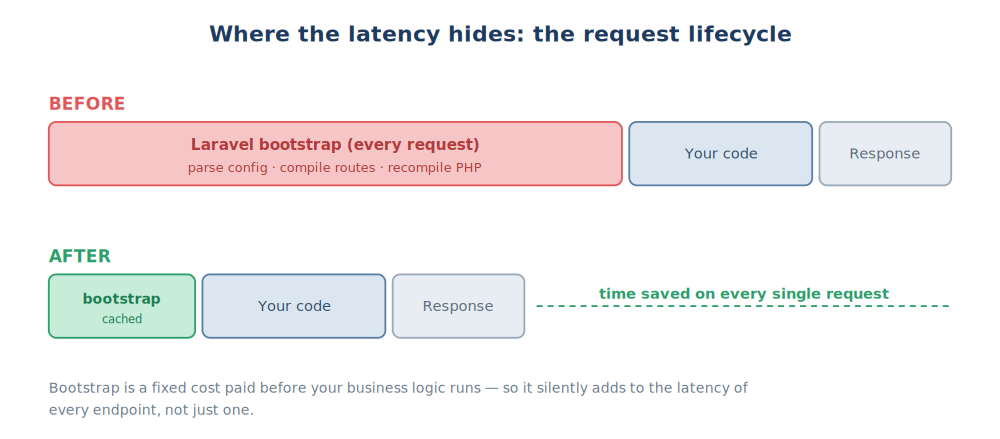
Before Laravel executes your controller, it first needs to bootstrap the entire application.
Measure Before You Optimize
Rather than continue guessing, I benchmarked the application using ApacheBench.
ab -n 1   -c 1   <url>
ab -n 20  -c 1   <url>
ab -n 100 -c 10  <url>
ab -n 300 -c 50  <url>
The metrics I cared about were:
Average response time
Requests per second
P95 latency
The Experiment
To eliminate every possible variable, I created the simplest endpoint possible.
Route::get('/ping', function () {
    return response()->json([
        'ok' => true,
    ]);
});
No database.
No Redis.
No authentication.
No business logic.
Then I benchmarked it.
ab -n 1 -c 1 https://<host>/api/pingThe endpoint still took around one second to respond.
If an endpoint that does almost nothing is slow, the bottleneck probably isn't your application code.
Why This Happens
A brand-new Laravel application boots very quickly.
The problem appears as the application grows.
Over time, projects naturally accumulate:
More Composer packages
More Service Providers
More configuration files
More routes
More middleware
More event listeners
None of these are inherently bad.
They're simply the cost of building more features.
The downside is that Laravel has more work to perform before your controller even runs.
When your business logic only takes 30–50 ms, framework startup can become a significant portion of the total request time.
What Happens Before Your Code Runs
For every request, Laravel typically needs to:
Load configuration
Register service providers
Bootstrap the service container
Load the routing table
Initialize the application
Meanwhile, PHP also parses and compiles your source code unless OPcache is enabled.
Although none of this belongs to your business logic, every request still pays the cost.
The Fix
Fortunately, Laravel already provides most of the optimization needed.
php artisan optimizeThis command generates optimized caches for:
Configuration
Routes
Events
Views
Instead of rebuilding these structures for every request, Laravel loads precompiled versions.
The second optimization is enabling OPcache.
Rather than parsing and compiling PHP files repeatedly, OPcache stores compiled bytecode in shared memory so PHP workers can reuse it.
Together, these optimizations significantly reduce framework startup time.
One Important Prerequisite
Before enabling configuration caching, make sure your application no longer calls env() outside the config/ directory.
✅ Recommended
// config/services.php

return [
    'payment' => [
        'key' => env('PAYMENT_KEY'),
    ],
];config('services.payment.key');❌ Avoid
env('PAYMENT_KEY');inside controllers, services, models, or repositories.
Once configuration is cached, these calls will return null.
Results
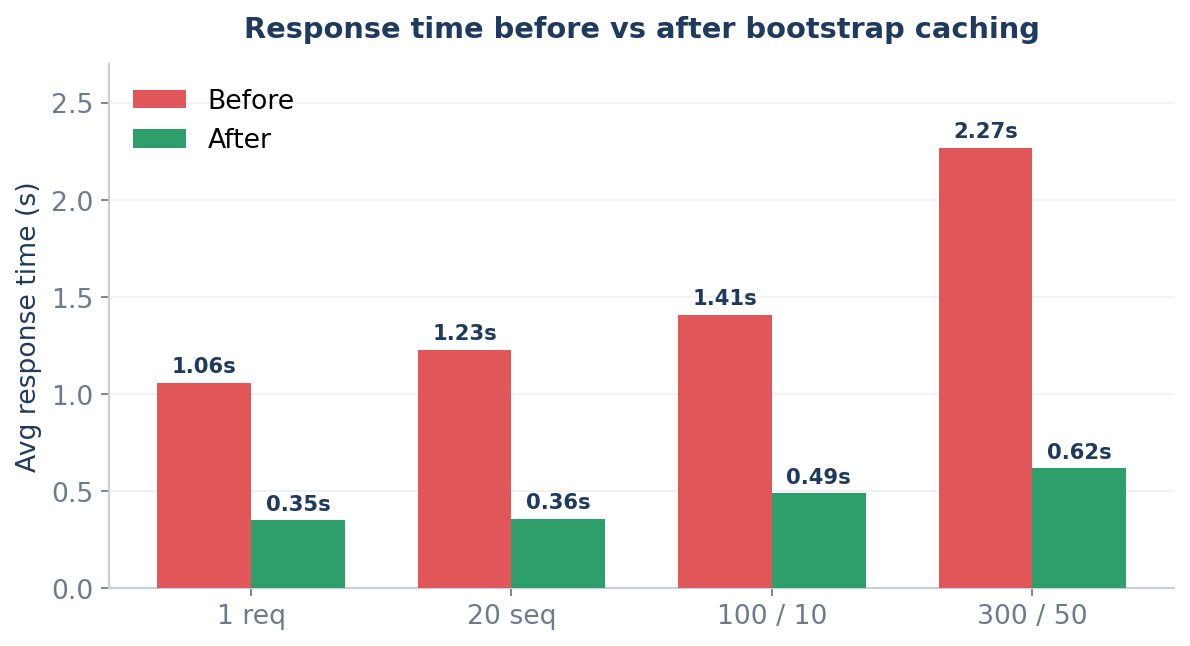
Load | Before | After |
|---|---|---|
1 request | 1.06 s | 0.35 s |
20 requests | 1.23 s | 0.36 s |
100 / 10 concurrent | 1.41 s | 0.49 s |
300 / 50 concurrent | 2.27 s | 0.62 s |
The improvements were immediate.
🚀 Up to 70% lower latency
📈 Throughput increased from 22 → 81 req/s
✅ No business logic changes
✅ No SQL optimization
✅ No infrastructure changes
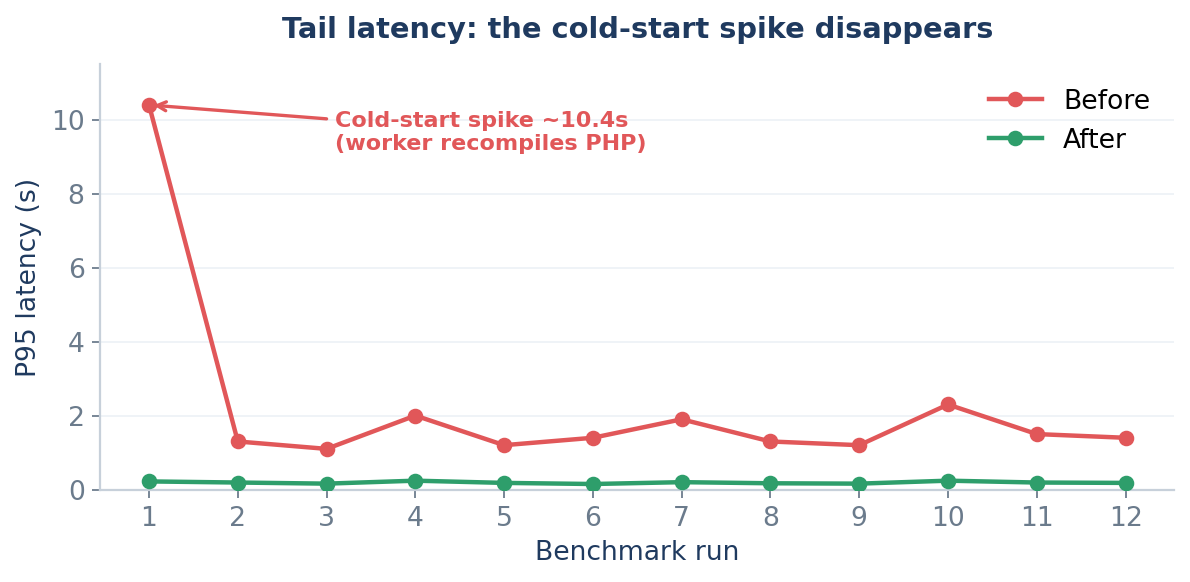
Even better, the cold-start latency spikes disappeared.
Key Takeaways
Optimizing backend performance isn't just about writing better code.
As applications grow, there are multiple layers worth optimizing:
Application logic
Database queries
Application caching
External services
Framework bootstrap
PHP runtime (OPcache)
Most of us spend nearly all our time optimizing the first few layers.
In my case, the biggest bottleneck wasn't the code I wrote.
It was the work Laravel repeated before my code ever started running.
Sometimes the fastest code isn't the code you optimize—it's the work you stop doing on every request.